Create a LASER Project Proposal in DMPonline
1. Create a new plan: Once signed in, click Create plan at the top right of the page.
Enter your project title, then under Your Organisation’s Templates, select University of Leeds: LASER Project Proposal.
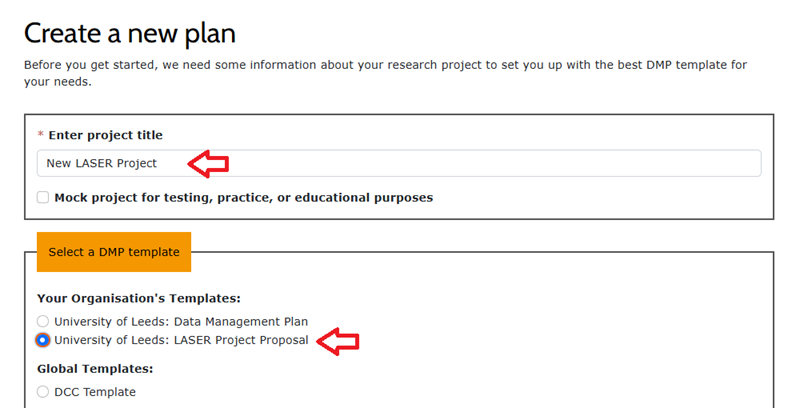
Scroll down and click Create at the bottom of the page.
2. Start writing your plan: Go to the Project details tab and add some general information about your project.
Then head to the Write Plan tab and provide more detailed information about your project proposal.
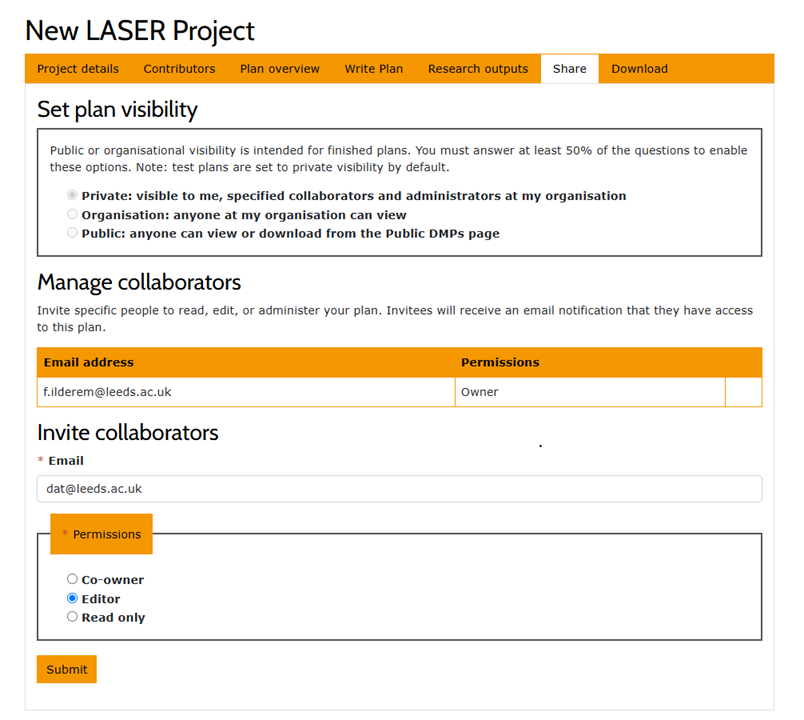
3. Share your plan with the team: Once your project proposal is complete, go to the Share tab. Under Invite collaborators, enter:
dat@leeds.ac.uk
Set the permission to Editor, then click Submit. This makes your plan visible to the Data Analytics Team.
4. Notify the team: Once you’ve submitted, please email dat@leeds.ac.uk to let us know your proposal is complete, so we can review it.